15 Kasım 2013 Cuma

C# - if else örnekleri TEMEL MANTIK


using System;
using System.Collections.Generic;
using System.Linq;
using System.Text;

namespace C_Sharp_if_örnekler
{
    class Program
    {
        static void Main(string[] args)
        {

            
            // C Sharp if örnekler 1 : Bir öğerncinin aldığını notlara göre dersi geçip geçmediğini 
            // konsol ekranına yazdırın.(geçme notu 45 olsun)

            int not1;
            int not2;
            int sozlu;

            Console.Write("Birinci Notunuzu Giriniz : ");
            not1 = Convert.ToInt16(Console.ReadLine());

            Console.Write("İkinci Notunuzu Giriniz : ");
            not2 = Convert.ToInt16(Console.ReadLine());

            Console.Write("Sözlü Notunuzu Giriniz : ");
            sozlu = Convert.ToInt16(Console.ReadLine());
 
            //Konsol ekranından birinci not, ikinci not ve sözlü notu girildikten sonra
            //not ortalamasını hesaplayalım

            int ortalama = 0;

            ortalama = (not1 + not2 + sozlu) / 3;

            //şimdi hesaplanan ortalamaya göre öğrencinin dersi geçip geçmediğini konsol ekranına
            //yazdıralım

            if (ortalama >= 45)
            {
                Console.Write("\nDersi Geçtiniz. Tebrikler...\n\n");
            }
            else
            {
                Console.Write("\nDersi Geçemediniz. Kaldınız...\n\n");
            }


            // C Sharp if örnekler 2 : Bir öğerncinin aldığını notlara göre dersi hangi derece ile 
            // bitirdiğini konsol ekranına yazdırın.

            int not_1;
            int not_2;
            int sozlu_1;

            Console.Write("\n\nBirinci Notunuzu Giriniz : ");
            not_1 = Convert.ToInt16(Console.ReadLine());

            Console.Write("İkinci Notunuzu Giriniz : ");
            not_2 = Convert.ToInt16(Console.ReadLine());

            Console.Write("Sözlü Notunuzu Giriniz : ");
            sozlu_1 = Convert.ToInt16(Console.ReadLine());

            //Konsol ekranından birinci not, ikinci not ve sözlü notu girildikten sonra
            //not ortalamasını hesaplayalım

            ortalama = 0;

            ortalama = (not_1 + not_2 + sozlu_1) / 3;

            //şimdi hesaplanan ortalamaya göre öğrencinin dersi hangi derece ile bitirdiğini konsol 
            //ekranına yazdıralım

            if (ortalama < 45)
            {
                Console.Write("Derece Notunuz : 1");
            }
            else if (ortalama >= 45 && ortalama <54)
            {
                Console.Write("Derece Notunuz : 2");
            }
            else if (ortalama >= 55 && ortalama < 69)
            {
                Console.Write("Derece Notunuz : 3");
            }
            else if (ortalama >= 70 && ortalama < 84)
            {
                Console.Write("Derece Notunuz : 4");
            }
            else
            {
                Console.Write("Derece Notunuz : 5");
            }

            Console.Write("\n\n");

            // C Sharp if örnekler 3 : Bir öğerncinin aldığını notlara göre dersi hangi derece ile 
            // bitirdiğini konsol ekranına yazı olarak yazdırın.

            int not;
            Console.Write("\n\n");
            Console.Write("Sınavdan Aldığnız Notu Rakam Olarak Giriniz: ");
            not = Convert.ToInt16(Console.ReadLine());

            //şimdi girilen not hangi aralıkta ise ona göre başarı durumunu 5 lik sisteme göre
            //yazdıralım

            if (not >=0 && not < 45)
            {
                Console.Write("Dereceniz : Başarısız");
            }
            else if (not >= 45 && not < 54)
            {
                Console.Write("Dereceniz : Geçer");
            }
            else if (not >= 55 && not < 69)
            {
                Console.Write("Dereceniz : Orta");
            }
            else if (not >= 70 && not < 84)
            {
                Console.Write("Dereceniz : İyi");
            }
            else if (not >= 84 && not <= 100)
            {
                Console.Write("Dereceniz : Pekiyi");
            }
            else if ((not < 0) && (not > 100))
            {
                Console.Write("Girdiğiniz Not Hatalı...");
            }

            Console.Write("\n\n");

            // C Sharp if örnekler 4 : Konsoldan girilen parola doğrulaması yapan bir uygulama yazın.

            //parolamız 1234ankara06 olsun

            Console.Write("\n\n");
            string parola = "1234ankara06";
            string girilenParola = "";

            Console.Write("Parolayı Giriniz : ");

            // girilen değer girilenParola değişkenine atayalım
            girilenParola = Console.ReadLine();

            //şimdi girilen parola doğru mu yanlış mı kontrolü yaplım

            if (girilenParola == parola)
            {
                Console.Write("Girdiğiniz parola doğru...");
            }
            else
            {
                Console.Write("Girdiğiniz parola yanlış...");
            }

            Console.Write("\n\n");
            Console.Write("\n\n");


            // C Sharp if örnekler 5 : Rastgele 0 ile 100 arasında bir sayı girerek programın tarafından
            // oluşturulan sayıyı tahmin eden uygulama yazın

            //Rastgele sayı üretmek için Random nesnesini bir örneğini oluşturalım
            Random sayi = new Random();

            //Oyuna devam edilip edilmeyeceğini karar vermek için int tipinde bir değişken oluşturalım
            int devam = 0;

            while (true)
            {
                int ustsinir = 100, girilenSayi;

                int üretilen = sayi.Next(ustsinir);

                Console.WriteLine("Yeni oyun Başladı...");

                Console.WriteLine(ustsinir + " dan kucuk bir sayi giriniz");

                //Burada sonsuz döngü oluşturalım ki oyun sayı buluna kadar devam etsin

                while (true)
                {
                    girilenSayi = Convert.ToInt32(Console.ReadLine());

                    if (girilenSayi < üretilen)
                    {
                        Console.WriteLine("daha büyük bir sayi giriniz");
                    }
                    else
                    {
                        if (girilenSayi > üretilen)
                        {
                            Console.WriteLine("daha kücük bir sayi giriniz");
                        }
                        else
                        {
                            if (girilenSayi == üretilen)
                            {
                                Console.WriteLine("Tebrikler bildiniz");
                                break;
                            }
                        }
                    }
                }

                Console.WriteLine("Yeni oyun icin->1, cikmak icin ->0 giriniz");

                devam = Convert.ToInt32(Console.ReadLine());

                //Kullanıcı sayı tahmin oyunundan çıkmak istediğinde break komutu ile
                //döngüden çıkalım ve oyunu bitirelim
                if (devam == 0)
                {
                    break;
                }

            }

            Console.ReadKey();
        }
    }
}


/* C Sharp if örnekler program çıktısı:
 * 
 * C Sharp if örnekler 1 :
 * 
Birinci Notunuzu Giriniz : 78
İkinci Notunuzu Giriniz : 87
Sözlü Notunuzu Giriniz : 85

Dersi Geçtiniz. Tebrikler...


 * 
 * C Sharp if örnekler 2 :
 * 
Birinci Notunuzu Giriniz : 67
İkinci Notunuzu Giriniz : 88
Sözlü Notunuzu Giriniz : 90
Derece Notunuz : 4


 * 
 * C Sharp if örnekler 3 :
 * 
Sınavdan Aldığnız Notu Rakam Olarak Giriniz: 87
Dereceniz : Pekiyi

 * 
 * C Sharp if örnekler 4 :
 * 

Parolayı Giriniz : 4546ankara
Girdiğiniz parola yanlış...

 * 
 * C Sharp if örnekler 5 :
 * 

Yeni oyun Başladı...
100 dan kucuk bir sayi giriniz
45
daha kücük bir sayi giriniz
33
daha kücük bir sayi giriniz
11
daha kücük bir sayi giriniz
4
daha kücük bir sayi giriniz
3
daha kücük bir sayi giriniz
2
daha kücük bir sayi giriniz
1
daha kücük bir sayi giriniz
0
Tebrikler bildiniz
Yeni oyun icin->1, cikmak icin ->0 giriniz


*/

kaynak: http://www.csharpuygulamalar.com

YAZI İÇİN TEŞEKKÜRLER

C# Modern Hesap Makinesi Yapımı


Csharp ile Modern Hesap Makinesi yapımı

KODLAR:

using System;
using System.Collections.Generic;
using System.ComponentModel;
using System.Data;
using System.Drawing;
using System.Text;
using System.Windows.Forms;

namespace Modern_Hesap_Makinesi
{
    public partial class Modern_Hesap_Makinesi : Form
    {
        decimal birinciSayi, ikinciSayi, hafiza;

        string islem;

        Boolean sonuclandi;


        public Modern_Hesap_Makinesi()
        {
            InitializeComponent();
        }

        private void Modern_Hesap_Makinesi_Load(object sender, System.EventArgs e)
        {
            this.Text = "Hesap Makinesi";

            txtSonuc.Text = "";

            this.CancelButton = btnKapat;
        }

        private void rakamlar(object sender, System.EventArgs e)
        {
            if (sonuclandi)
                txtSonuc.Text = (sender as Button).Text;
            else
            {
                txtSonuc.Text = txtSonuc.Text + (sender as Button).Text;
            }
            sonuclandi = false;
        }

        private void btnArtiEksi_Click(object sender, System.EventArgs e)
        {
            if (txtSonuc.Text.Length > 0)

                if (txtSonuc.Text.Substring(0, 1) == "-")

                    //Sayinin basinda - varsa sil

                    txtSonuc.Text = txtSonuc.Text.Substring(1);

                else
                    //- yoksa - ekle
                    txtSonuc.Text = "-" + txtSonuc.Text.Substring(0);
        }

        private void btnVirgul_Click(object sender, System.EventArgs e)
        {
            //sayida virgul yoksa

            if (txtSonuc.Text.IndexOf(",") <= 0)

                if (txtSonuc.Text.Length == 0)

                    //hiç karakter yoksa 0, ekle

                    txtSonuc.Text = "0,";

                else

                    //sayi varsa sonuna virgul ekle
                    txtSonuc.Text = txtSonuc.Text + ",";
        }

        private void btnSil_Click(object sender, System.EventArgs e)
        {
            txtSonuc.Text = "";
        }

        private void btnGeriSil_Click(object sender, System.EventArgs e)
        {
            if (txtSonuc.Text.Length > 0)
            {
                txtSonuc.Text = txtSonuc.Text.Substring(0, txtSonuc.Text.Length - 1);
            }
        }

        private void hafiza_islemleri(object sender, System.EventArgs e)
        {
            if (txtSonuc.Text.Length == 0)
            {
                txtSonuc.Text = "0";
            }

            switch ((sender as Button).Text)
            {
                case "MC":

                    hafiza = 0;
                    break;
                case "M+":

                    hafiza = hafiza + decimal.Parse(txtSonuc.Text);
                    break;
                case "M-":

                    hafiza = hafiza - decimal.Parse(txtSonuc.Text);
                    break;
                case "MR":

                    txtSonuc.Text = hafiza.ToString();
                    break;
            }
        }

        private void Dört_islem(object sender, System.EventArgs e)
        {
            islem = (sender as Button).Text;

            if (txtSonuc.Text.Length == 0)
            {
                txtSonuc.Text = "0";
            }

            birinciSayi = decimal.Parse(txtSonuc.Text);

            sonuclandi = true;
        }

        private void Button_Esit_Click(object sender, System.EventArgs e)
        {
            if (txtSonuc.Text.Length == 0)
            {
                txtSonuc.Text = "0";
            }

            decimal sonuc = 0;

            ikinciSayi = decimal.Parse(txtSonuc.Text);

            switch (islem)
            {
                case "+":

                    sonuc = birinciSayi + ikinciSayi;
                    break;
                case "-":

                    sonuc = birinciSayi - ikinciSayi;
                    break;
                case "*":

                    sonuc = birinciSayi * ikinciSayi;
                    break;
                case "/":

                    if (ikinciSayi == 0)
                        return;
                    sonuc = birinciSayi / ikinciSayi;
                    break;
            }

            sonuclandi = true;

            txtSonuc.Text = sonuc.ToString();

            birinciSayi = sonuc;
        }

        private void islem_Yap_2(object sender, System.EventArgs e)
        {
            decimal sayi;

            if (txtSonuc.Text.Length == 0)

                txtSonuc.Text = "0";


            sayi = decimal.Parse(txtSonuc.Text);

            switch ((sender as Button).Text)
            {
                case "Kök":

                    if (sayi >= 0)
                        txtSonuc.Text = Math.Sqrt((double)sayi).ToString();
                    break;
                case "x²":

                    txtSonuc.Text = (sayi * sayi).ToString();
                    break;
                case "1/x":

                    if (sayi != 0)
                        txtSonuc.Text = (1 / sayi).ToString();
                    break;
            }
        }

        private void kapat_Click(object sender, EventArgs e)
        {
            //Programı Kapat
            this.Close();
        }
    }
}


UYGULAMAYI INDIR

http://www.csharpuygulamalar.com'a teşekkürler

Csharp Exe'ye Dosya Gömme ve Kullanma


KODLAR:

using System;
using System.Collections.Generic;
using System.ComponentModel;
using System.Data;
using System.Drawing;
using System.Linq;
using System.Text;
using System.Windows.Forms;
//ve şu alttaki 2 kütüphande gerekli....
using System.IO;
using System.Media; 

namespace Ders_1___exeye_dosya_gömme_ve_kullanma
{
public partial class Form1 : Form
{
//programın başına bunları eklemezseniz sesi çaldırmazsınız...

public static Stream str = Properties.Resources.fon_effect;
public static SoundPlayer snd = new SoundPlayer(str);

public Form1()
{
InitializeComponent();
}
private void btn_sec_Click(object sender, EventArgs e)
{
// buradaki kodlar kayıt yolunu seçmek için
FolderBrowserDialog yol_sec = new FolderBrowserDialog();
yol_sec.Description = "KAYIT DİZİNİNİ SEÇİNİZ...";
yol_sec.ShowNewFolderButton = true;

if (yol_sec.ShowDialog() == DialogResult.OK) {
textBox1.Text = yol_sec.SelectedPath; 
}
}
private void btn_cikar_Click(object sender, EventArgs e)
{ 
//buradaki kodlar gentleman.mp3 dosyasını belirtilen yere çıkartmak için

byte[] my_file = Properties.Resources.gentleman;
File.WriteAllBytes(textBox1.Text+@"\gent­leman.mp3",my_file);

MessageBox.Show("Dosya belirtilen dizine çıkarıldı...","Bilgi",MessageBoxButtons.­OK,MessageBoxIcon.Information);
}
private void btn_play_Click(object sender, EventArgs e)
{
//buradaki kodlar gömdüğümüz fon effect.wav dosyasını çaldırtmak için prograamdan çıkartmadan çaldırmak için
btn_play.Enabled = false;
btn_stop.Enabled = true;
snd.PlayLooping(); //burada sesi çaldırıyoruz .. döngülü biçimde bitince başa döner.
}
private void btn_stop_Click(object sender, EventArgs e)
{
//burada demin bahsettiğim ses çalarken durdurmak için gereken kod....

btn_stop.Enabled = false;
btn_play.Enabled = true;
snd.Stop(); //burada sesi durduruyoruz...
}

private void Form1_Load(object sender, EventArgs e)
{
btn_stop.Enabled = false;
}
}
}

FIRAT EKŞİYE TEŞEKKÜRLER

27 Kasım 2011 Pazar

Datagridview - Dataset Kontrol


Datagrid nesnesinin etkin kullanımı ve dataset nesnesiyle bağlanması ile ilgili bilgilendirici içerikler mevcuttur. Adres Defteri uygulaması ile datagridview temelinizi oluşturacak ve kendi stok programlarınızı yazmanızı sağlayacaktır. 


16 Kasım 2011 Çarşamba

c#'da hata oluşturup bi yerde çağırmak


bilindiği gibi c#da try-catch olayı vardır;hata olmadığı durumlarda hata olduğu zaman try catch çalışır.
peki kendimiz bir hata oluşturmak istersek?????:


1. yol:
//exception sınıfından oluşturulan hata


Exception hata = new Exception("Bu benim hatam");


//oluşan hatayı nesnenin hata mimarisi içine fırlatma.


throw hata;//burda hata verir 
//program throw kısmına gelince hata verir ve hata ekranında "bu benim hatam",yazar 
2.yol:class kullanarak yapalım
class KendiHatamiz : Exception


{
public KendiHatamiz()


: base("hatası")


{}
}
int main()
{
KendiHatamiz kndHata = new KendiHatamiz();


throw kndHata;//burda da hata verir
//throw'a geldiğinde program durur ve hata alanında "hatası ",yazar.
}

c#da property kavramı


class sınıf
{
public int yas;
private string öğrenciadı;
private string ad
{
get { return öğrenciadı; }
set { öğrenciadı = value; }
}
public int Yas
{
get
{return yas;}
set
{if (value >= 0)
yas = value;}
}
{
public void Yaz()
{
Console.WriteLine( öğrenciadı+ "  " + yas);
}
static void Main(string[] args){
sınıf f = new sınıf();
f.yas=22;
f.öğrenciadı="ali";
f.yaz();
}} 

DataGrid ile ziyaretçi defteri yapma

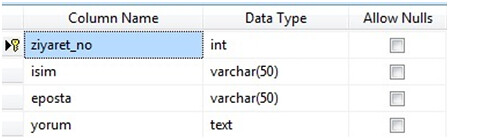
Evet arkadaşlar bir çok sitede gördüğümüz ziyaretçi defterini oluşturacağız.İlk önce veri tabanımızı aşağıdaki gibi bir table oluşturuyoruz.Table’ın adını defter koyuyoruz.
Birde veri tabanımızda Stored Procedures’ü dışarıdan girdiğimiz verileri kaydetmek için aşağıdaki gibi oluşturuyoruz.
Şimdi aspx kısmında dizaynımızı yapıyoruz.
<table class=”style1″>
<tr>
<td class=”style2″ colspan=”2″>
Ziyaret Defteri</td>
</tr>
<tr>
<td class=”style3″>
İsim</td>
<td>
<asp:TextBox ID=”txtad” runat=”server” BorderStyle=”Solid”></asp:TextBox>
</td>
</tr>
<tr>
<td class=”style3″>
E-posta</td>
<td>
<asp:TextBox ID=”txtposta” runat=”server” BorderStyle=”Solid”></asp:TextBox>
</td>
</tr>
<tr>
<td class=”style3″>
Yorum</td>
<td>
<asp:TextBox ID=”txtyorum” runat=”server” BorderStyle=”Solid” Height=”130px”
TextMode=”MultiLine” Width=”359px”></asp:TextBox>
</td>
</tr>
<tr>
<td class=”style3″>
<asp:Button ID=”Button1″ runat=”server” Text=”Kaydet” onclick=”Button1_Click” />
</td>
<td>
&nbsp;</td>
</tr>
</table>

Burda Kullanıcı adı için txtad’ı eposta için txtposta’yı yorumlar içinde txtyorum’u oluşturuyoruz fakat burda Properties den TextModunu MultiLine yapıyoruz.(Yorumlarımız uzun olabileceğinden dolayı yaptık.)
Code behind kısmına geciyoruz.
protected void Button1_Click(object sender, EventArgs e)
{
SqlConnection baglantı = new SqlConnection(ConfigurationManager.ConnectionStrings["Database"].ConnectionString);
SqlCommand komut = new SqlCommand(“ziyaretdefteri”, baglantı);
komut.CommandType = CommandType.StoredProcedure;
komut.Parameters.Add(“@isim”, SqlDbType.VarChar).Value = txtad.Text;
komut.Parameters.Add(“@eposta”, SqlDbType.VarChar).Value = txtposta.Text;
komut.Parameters.Add(“@yorum”, SqlDbType.Text).Value = txtyorum.Text;
baglantı.Open();
komut.ExecuteNonQuery();
baglantı.Close();
}

Burada textboxlara girdiğimiz verileri stored procedures veri tabanına kaydediyoruz.
Şimdi veritabanımıza kaydettiğimiz verileri DataGrid ile sayfamızda gösterecez.Toolbox dan DataGridi sayfamıza sürükleyip bırakıyoruz. Şimdi aşağıdaki resimlerdeki adımları takip edip bağlantımızı oluşturuyoruz.